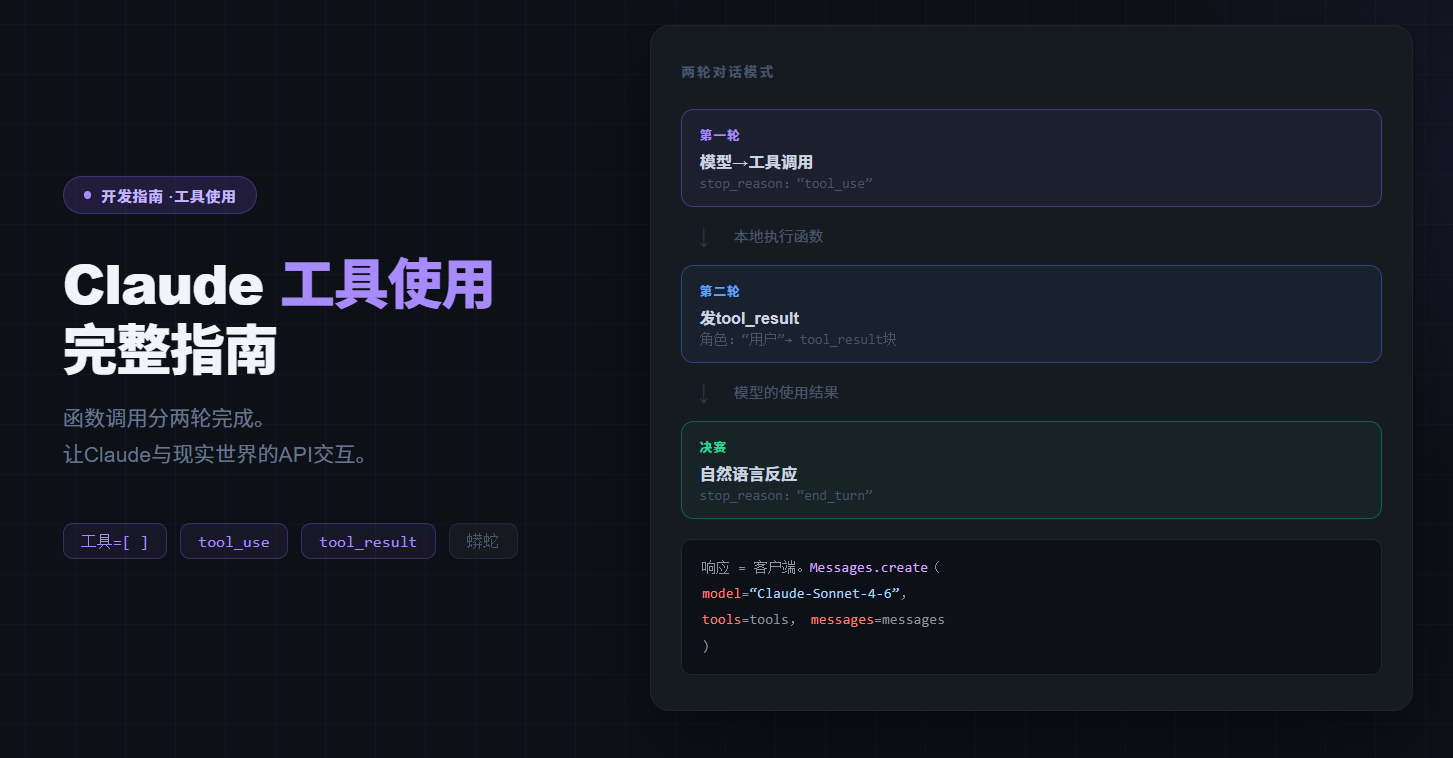
Claude API Tool Use 实战:让 AI 调用你的函数和外部服务
结论先说: Tool Use(工具调用)是让 Claude 从「只会聊天」变成「能干事」的核心能力。你定义好函数的名称、描述和参数格式,Claude 会自动判断什么时候调用、传什么参数——你只需要负责真正执行这个函数,再把结果送回给 Claude,它就能给出基于真实数据的最终回答。本文从单工具调用讲到多工具并行,再到实际业务场景,含三组完整可运行的 Python 代码。
Tool Use 能解决什么问题
纯语言模型有一个硬限制:它只能处理你发给它的文字,无法主动获取实时数据或操作外部系统。
Tool Use 打破了这个限制:
没有 Tool Use:
  用户:「北京今天天气怎样?」
  Claude:「我的训练数据截止到某个时间,无法提供实时天气…」

有了 Tool Use:
  用户:「北京今天天气怎样?」
  Claude:调用 get_weather("北京") → 拿到 22°C 晴
  Claude:「北京今天晴,22°C,湿度 35%,非常舒适!」
没有 Tool Use:
  用户:「北京今天天气怎样?」
  Claude:「我的训练数据截止到某个时间,无法提供实时天气…」

有了 Tool Use:
  用户:「北京今天天气怎样?」
  Claude:调用 get_weather("北京") → 拿到 22°C 晴
  Claude:「北京今天晴,22°C,湿度 35%,非常舒适!」
典型适用场景: 实时数据查询(天气、股价、汇率)、业务系统操作(查订单、查库存)、代码执行、多步骤任务编排。
核心概念:Tool 的三要素
每个 Tool 必须定义三个字段,Claude 靠这三个字段判断「要不要调用」和「传什么参数」:
{
    "name": "get_weather",
    "description": "获取指定城市的当前天气信息。返回温度(摄氏度)、天气状况和湿度。",
    "input_schema": {
        "type": "object",
        "properties": {
            "city": {
                "type": "string",
                "description": "城市名称,例如:北京、上海、广州"
            }
        },
        "required": ["city"]
    }
}
{
    "name": "get_weather",
    "description": "获取指定城市的当前天气信息。返回温度(摄氏度)、天气状况和湿度。",
    "input_schema": {
        "type": "object",
        "properties": {
            "city": {
                "type": "string",
                "description": "城市名称,例如:北京、上海、广州"
            }
        },
        "required": ["city"]
    }
}
description 是成败关键:写得越清楚,Claude 的调用准确率越高。「什么情况下调用」「返回什么格式的数据」都应该写进去。接入环境配置可参考 Claude API Python 入门教程。
实战一:单工具调用(天气查询)
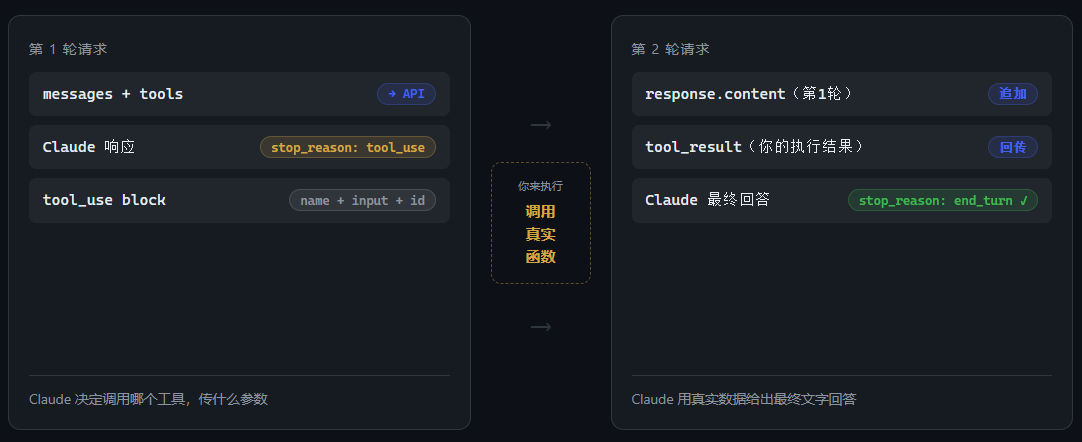
Tool Use 的完整流程是两轮对话:
# 代码来源:实验日志 Step 2
import anthropic, json, os
from dotenv import load_dotenv

load_dotenv()
client = anthropic.Anthropic(
    api_key=os.environ.get("CLAUDEAPI_KEY"),
    base_url="https://gw.claudeapi.com",
)

tools = [{
    "name": "get_weather",
    "description": "获取指定城市的当前天气信息。返回温度(摄氏度)、天气状况和湿度。",
    "input_schema": {
        "type": "object",
        "properties": {
            "city": {"type": "string", "description": "城市名称,例如:北京、上海、广州"}
        },
        "required": ["city"]
    }
}]

# ── 第一轮:Claude 决定调用工具 ──────────────────────────────
response = client.messages.create(
    model="claude-sonnet-4-6",
    max_tokens=1024,
    tools=tools,
    messages=[{"role": "user", "content": "北京今天天气怎么样?"}],
)
# stop_reason: tool_use → Claude 要调用工具了
tool_block = next(b for b in response.content if b.type == "tool_use")
print(f"调用工具: {tool_block.name}, 参数: {tool_block.input}")
# 调用工具: get_weather, 参数: {'city': '北京'}

# ── 执行函数(生产环境替换为真实 API 调用)────────────────────
def get_weather(city: str) -> dict:
    mock_data = {
        "北京": {"temp": 22, "condition": "晴", "humidity": 35},
        "上海": {"temp": 26, "condition": "多云", "humidity": 72},
    }
    return mock_data.get(city, {"temp": 20, "condition": "未知", "humidity": 50})

tool_result = get_weather(**tool_block.input)

# ── 第二轮:送回工具结果,Claude 给最终回答 ──────────────────
response2 = client.messages.create(
    model="claude-sonnet-4-6",
    max_tokens=1024,
    tools=tools,
    messages=[
        {"role": "user", "content": "北京今天天气怎么样?"},
        {"role": "assistant", "content": response.content},   # 原样保留第一轮响应
        {"role": "user", "content": [{
            "type": "tool_result",
            "tool_use_id": tool_block.id,                     # 对应第一轮的 id
            "content": json.dumps(tool_result, ensure_ascii=False)
        }]}
    ],
)
print(f"最终回答:{response2.content[0].text}")
# 北京今天天气晴朗,气温 22°C,湿度较低为 35%,是个舒适的好天气!
# 代码来源:实验日志 Step 2
import anthropic, json, os
from dotenv import load_dotenv

load_dotenv()
client = anthropic.Anthropic(
    api_key=os.environ.get("CLAUDEAPI_KEY"),
    base_url="https://gw.claudeapi.com",
)

tools = [{
    "name": "get_weather",
    "description": "获取指定城市的当前天气信息。返回温度(摄氏度)、天气状况和湿度。",
    "input_schema": {
        "type": "object",
        "properties": {
            "city": {"type": "string", "description": "城市名称,例如:北京、上海、广州"}
        },
        "required": ["city"]
    }
}]

# ── 第一轮:Claude 决定调用工具 ──────────────────────────────
response = client.messages.create(
    model="claude-sonnet-4-6",
    max_tokens=1024,
    tools=tools,
    messages=[{"role": "user", "content": "北京今天天气怎么样?"}],
)
# stop_reason: tool_use → Claude 要调用工具了
tool_block = next(b for b in response.content if b.type == "tool_use")
print(f"调用工具: {tool_block.name}, 参数: {tool_block.input}")
# 调用工具: get_weather, 参数: {'city': '北京'}

# ── 执行函数(生产环境替换为真实 API 调用)────────────────────
def get_weather(city: str) -> dict:
    mock_data = {
        "北京": {"temp": 22, "condition": "晴", "humidity": 35},
        "上海": {"temp": 26, "condition": "多云", "humidity": 72},
    }
    return mock_data.get(city, {"temp": 20, "condition": "未知", "humidity": 50})

tool_result = get_weather(**tool_block.input)

# ── 第二轮:送回工具结果,Claude 给最终回答 ──────────────────
response2 = client.messages.create(
    model="claude-sonnet-4-6",
    max_tokens=1024,
    tools=tools,
    messages=[
        {"role": "user", "content": "北京今天天气怎么样?"},
        {"role": "assistant", "content": response.content},   # 原样保留第一轮响应
        {"role": "user", "content": [{
            "type": "tool_result",
            "tool_use_id": tool_block.id,                     # 对应第一轮的 id
            "content": json.dumps(tool_result, ensure_ascii=False)
        }]}
    ],
)
print(f"最终回答:{response2.content[0].text}")
# 北京今天天气晴朗,气温 22°C,湿度较低为 35%,是个舒适的好天气!
实战二:多工具并行调用
当用户问题涉及多个工具时,Claude 会在单次响应中同时调用多个工具,把所有结果一次性回传即可:
tools = [
    {
        "name": "get_weather",
        "description": "获取指定城市的当前天气信息,返回温度、天气状况和湿度。",
        "input_schema": {
            "type": "object",
            "properties": {"city": {"type": "string", "description": "城市名称"}},
            "required": ["city"]
        }
    },
    {
        "name": "get_exchange_rate",
        "description": "获取两种货币之间的当前汇率。",
        "input_schema": {
            "type": "object",
            "properties": {
                "from_currency": {"type": "string", "description": "源货币代码,如 USD、EUR、CNY"},
                "to_currency":   {"type": "string", "description": "目标货币代码"}
            },
            "required": ["from_currency", "to_currency"]
        }
    }
]

messages = [{"role": "user", "content": "上海今天天气怎样?另外 100 美元等于多少人民币?"}]

response = client.messages.create(
    model="claude-sonnet-4-6", max_tokens=1024, tools=tools, messages=messages
)
# Claude 同时调用了两个工具:
# → get_weather({'city': '上海'})
# → get_exchange_rate({'from_currency': 'USD', 'to_currency': 'CNY'})

# 收集所有工具结果,一次性回传(重要:放在同一个 user message 里)
tool_results = []
for block in response.content:
    if block.type == "tool_use":
        result = TOOL_MAP[block.name](**block.input)
        tool_results.append({
            "type": "tool_result",
            "tool_use_id": block.id,
            "content": json.dumps(result, ensure_ascii=False)
        })

messages.append({"role": "assistant", "content": response.content})
messages.append({"role": "user", "content": tool_results})

response2 = client.messages.create(
    model="claude-sonnet-4-6", max_tokens=1024, tools=tools, messages=messages
)
# 上海今天多云,气温约 26°C,湿度 72%。
# 100 美元约等于 724 元人民币(汇率 7.24)。
tools = [
    {
        "name": "get_weather",
        "description": "获取指定城市的当前天气信息,返回温度、天气状况和湿度。",
        "input_schema": {
            "type": "object",
            "properties": {"city": {"type": "string", "description": "城市名称"}},
            "required": ["city"]
        }
    },
    {
        "name": "get_exchange_rate",
        "description": "获取两种货币之间的当前汇率。",
        "input_schema": {
            "type": "object",
            "properties": {
                "from_currency": {"type": "string", "description": "源货币代码,如 USD、EUR、CNY"},
                "to_currency":   {"type": "string", "description": "目标货币代码"}
            },
            "required": ["from_currency", "to_currency"]
        }
    }
]

messages = [{"role": "user", "content": "上海今天天气怎样?另外 100 美元等于多少人民币?"}]

response = client.messages.create(
    model="claude-sonnet-4-6", max_tokens=1024, tools=tools, messages=messages
)
# Claude 同时调用了两个工具:
# → get_weather({'city': '上海'})
# → get_exchange_rate({'from_currency': 'USD', 'to_currency': 'CNY'})

# 收集所有工具结果,一次性回传(重要:放在同一个 user message 里)
tool_results = []
for block in response.content:
    if block.type == "tool_use":
        result = TOOL_MAP[block.name](**block.input)
        tool_results.append({
            "type": "tool_result",
            "tool_use_id": block.id,
            "content": json.dumps(result, ensure_ascii=False)
        })

messages.append({"role": "assistant", "content": response.content})
messages.append({"role": "user", "content": tool_results})

response2 = client.messages.create(
    model="claude-sonnet-4-6", max_tokens=1024, tools=tools, messages=messages
)
# 上海今天多云,气温约 26°C,湿度 72%。
# 100 美元约等于 724 元人民币(汇率 7.24)。
实战三:业务场景——订单查询 + 错误处理
真实场景中工具可能返回错误,Claude 能自动把结构化错误转化为用户友好的回答:
def get_order_status(order_id: str) -> dict:
    ORDERS = {
        "ORD-12345678": {
            "status": "运输中", "carrier": "顺丰速运",
            "tracking": "SF1234567890", "eta": "2026-04-29"
        }
    }
    if order_id in ORDERS:
        return {"success": True, "order_id": order_id, **ORDERS[order_id]}
    # 订单不存在,返回结构化错误
    return {"success": False, "error": f"订单 {order_id} 不存在,请检查订单号"}
def get_order_status(order_id: str) -> dict:
    ORDERS = {
        "ORD-12345678": {
            "status": "运输中", "carrier": "顺丰速运",
            "tracking": "SF1234567890", "eta": "2026-04-29"
        }
    }
    if order_id in ORDERS:
        return {"success": True, "order_id": order_id, **ORDERS[order_id]}
    # 订单不存在,返回结构化错误
    return {"success": False, "error": f"订单 {order_id} 不存在,请检查订单号"}
运行结果:
# 正常查询
用户:帮我查一下订单 ORD-12345678 的状态
Claude:您的订单 ORD-12345678 目前运输中,顺丰速运承运,
        单号 SF1234567890,预计 4月29日送达。

# 订单不存在
用户:我的订单号是 ORD-00000000,帮我查一下
Claude:很抱歉,系统中找不到订单号 ORD-00000000。
        请确认订单号是否正确,或联系客服进一步协助。
# 正常查询
用户:帮我查一下订单 ORD-12345678 的状态
Claude:您的订单 ORD-12345678 目前运输中,顺丰速运承运,
        单号 SF1234567890,预计 4月29日送达。

# 订单不存在
用户:我的订单号是 ORD-00000000,帮我查一下
Claude:很抱歉,系统中找不到订单号 ORD-00000000。
        请确认订单号是否正确,或联系客服进一步协助。
Claude 收到 success: false 后不会崩溃,而是优雅转化为用户提示——错误处理逻辑可以交给 Claude,不必都写在业务代码里。
4 个高频踩坑
坑 1:只发一轮请求,拿不到最终回答
Tool Use 必须经历两轮:第一轮 Claude 返回 stop_reason: tool_use,你执行函数;第二轮送回 tool_result,才能拿到 stop_reason: end_turn 和最终文字。
坑 2:第一轮的 response.content 没有原样追加
第二轮 messages 里必须把第一轮完整的 response.content(含 text block + tool_use block)作为 assistant 消息追加,缺失会导致 API 报错。
坑 3:多工具结果分多条 message 回传
所有 tool_result 必须放在同一个 user message 的 content 列表里,不能拆开发送,否则 API 报消息结构错误。常见报错解法见 Claude API 报错完全手册。
坑 4:description 太短,Claude 乱调或不调工具
description 要说清楚三件事:何时调用、参数格式、返回内容。「获取天气」远不如「当用户询问某城市实时天气时调用,返回温度(摄氏度)、天气状况和湿度」有效。
与 Prompt Caching 结合
工具定义(tools 列表)通常每次请求都相同,是 Prompt Caching 的理想缓存对象。在最后一个工具上加 "cache_control": {"type": "ephemeral"} 即可,工具越多、调用越频繁,节省越显著。详见 提示词缓存实战。
常见问题
Q:Tool Use 支持哪些 Claude 模型?
A:ClaudeAPI 上所有主要模型均支持,包括 claude-opus-4-6、claude-sonnet-4-6、claude-haiku-4-5。Sonnet 4.6 在准确率与速度上的平衡最适合大多数业务场景。
Q:Claude 一直调工具不给最终回答怎么办?
A:在循环中检查 stop_reason,连续调用超过阈值(建议 5 次)时强制中断;或在 system prompt 明确写「最多调用工具 N 次后给出最终答案」。
Q:如何强制让 Claude 调用某个特定工具?
A:在请求中加 tool_choice={"type": "tool", "name": "your_tool_name"},Claude 会强制调用该工具。默认为 {"type": "auto"}(自行判断)。
注册 ClaudeAPI 拿到 API Key,把代码里的 CLAUDEAPI_KEY 换成你的密钥,三分钟内跑通第一个工具调用。更多接入细节见 Claude API Python 入门教程。
本文由 ClaudeAPI 团队出品。