
Claude API 报错完全手册:401 / 429 / 529 解决方案(2026最新)
The 6 most common Claude API errors — with real response bodies and step-by-step fixes for Python, curl, Cherry Studio, and Cursor
看完本文你将学会
- ✅ 快速识别 Claude API 的 6 类核心报错(401 / 400 / 429 / 529 / 000 / 404)
- ✅ 每种报错的真实 JSON 响应体长什么样
- ✅ Python SDK、curl、Cherry Studio、Cursor 四种场景下的报错表现
- ✅ 每种错误的一步解决方案,不绕弯子
- ✅ 国内连接超时的根本原因,以及彻底解决方案
- ✅ 指数退避重试代码,应对 429/529 不再中断任务
报错速查表(先看这个)
遇到报错先查这张表,找到你的 HTTP 状态码直接跳转:
| 状态码 | 错误类型 | 最常见原因 | 直接解决 |
|---|---|---|---|
| 401 | 认证失败 | API Key 错误或过期 | 重新复制 Key,检查有无多余空格 |
| 400 | 请求参数错误 | 模型名拼错、参数格式不对 | 对照文档检查 model 字段 |
| 429 | 请求过多 | 短时间请求量超出限制 | 加重试逻辑,或升级套餐 |
| 529 | 服务过载 | Anthropic 官方服务繁忙 | 稍等 30 秒重试,或换中转节点 |
| 000 | 连接失败 | 国内网络无法直连官方 API | 改用 ClaudeAPI.com 国内直连 |
| 404 | 模型不存在 | 模型 ID 拼写错误 | 对照本文末尾的模型列表 |
401 · 认证失败(Authentication Error)
你会看到什么
{
  "type": "error",
  "error": {
    "type": "authentication_error",
    "message": "invalid x-api-key"
  }
}
{
  "type": "error",
  "error": {
    "type": "authentication_error",
    "message": "invalid x-api-key"
  }
}
HTTP 状态码:401 Unauthorized
[图1:Python SDK 401 AuthenticationError 终端实际输出]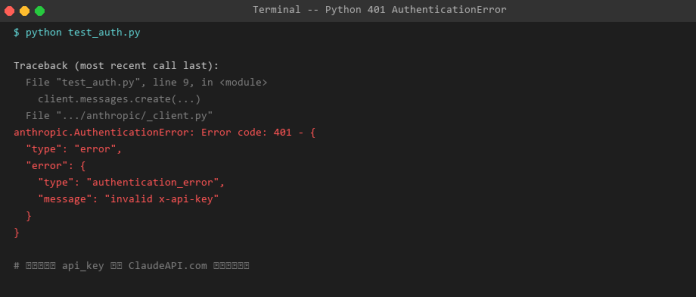
[图2:curl 401 Unauthorized 实际返回 JSON]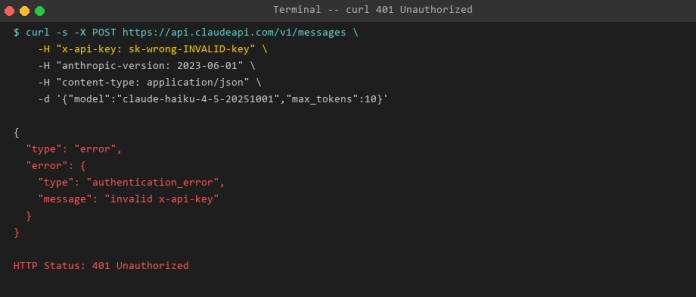
各客户端表现:
- Python SDK:终端 Traceback 最后一行
anthropic.AuthenticationError - curl:直接返回上方 JSON 错误体
- Cherry Studio:设置页显示红色提示框「连接失败 · 401 Unauthorized」,附
authentication_error: invalid x-api-key - Cursor:右下角通知气泡
⚠ Claude API Error: 401 Unauthorized,点击可展开完整信息
解决方案
| 原因 | 检查方式 | 修复操作 |
|---|---|---|
| Key 复制时带多余空格 | echo $ANTHROPIC_API_KEY | cat -A 查看末尾 |
重新复制,不要双击选中 |
| Key 已过期或被重置 | 登录 ClaudeAPI.com 后台确认 Key 状态 | 生成新 Key,替换所有配置 |
| 官方 Key 但请求打到中转 | 检查 base_url 和 Key 是否来自同一平台 |
Key 和 base_url 必须对应 |
| Windows 环境变量未生效 | echo %ANTHROPIC_API_KEY% |
用 PowerShell 重新设置,重启终端 |
正确写法(Python SDK):
import anthropic

client = anthropic.Anthropic(
    api_key="sk-YOUR-CLAUDEAPI-KEY",       # 来自 ClaudeAPI.com
    base_url="https://api.claudeapi.com"   # 国内直连地址
)
import anthropic

client = anthropic.Anthropic(
    api_key="sk-YOUR-CLAUDEAPI-KEY",       # 来自 ClaudeAPI.com
    base_url="https://api.claudeapi.com"   # 国内直连地址
)
Windows 用户注意:PowerShell 中用
$env:ANTHROPIC_API_KEY="sk-..."而不是export
400 · 请求参数错误(Invalid Request Error)
你会看到什么
{
  "type": "error",
  "error": {
    "type": "invalid_request_error",
    "message": "model `claude-3-5-sonnet` does not exist"
  }
}
{
  "type": "error",
  "error": {
    "type": "invalid_request_error",
    "message": "model `claude-3-5-sonnet` does not exist"
  }
}
[图3:Python 400 BadRequestError — 模型名写错触发的错误]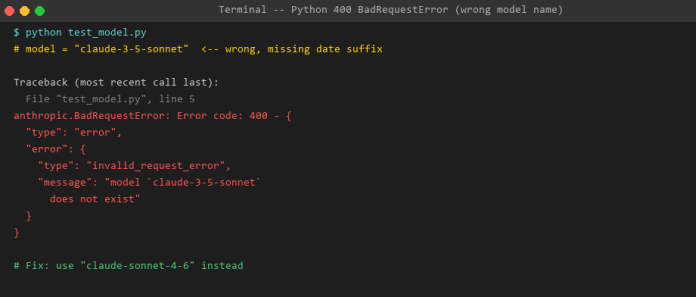
[图4:curl 400 Bad Request — 错误模型名返回的 JSON]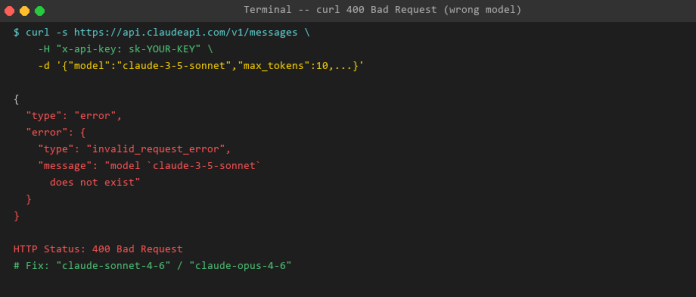
解决方案:2026 年正确模型 ID 对照表
| 想用的模型 | ❌ 错误写法 | ✅ 正确写法 |
|---|---|---|
| Claude Opus 最强版 | claude-opus-4 |
claude-opus-4-7 |
| Claude Opus 较强版 | claude-opus-4 |
claude-opus-4-6 |
| Claude Sonnet 日常版 | claude-3-5-sonnet |
claude-sonnet-4-6 |
| Claude Haiku 快速版 | claude-3-haiku |
claude-haiku-4-5-20251001 |
省心做法:直接从 ClaudeAPI.com 后台「可用模型列表」页复制模型 ID,不要手打,永远不会写错。
429 · 请求超限(Rate Limit Error)
你会看到什么
{
  "type": "error",
  "error": {
    "type": "rate_limit_error",
    "message": "Rate limit exceeded. Please retry after 60 seconds."
  }
}
{
  "type": "error",
  "error": {
    "type": "rate_limit_error",
    "message": "Rate limit exceeded. Please retry after 60 seconds."
  }
}
响应头还会附带:retry-after: 60
[图5:Python 429 RateLimitError — 批量请求触发限流]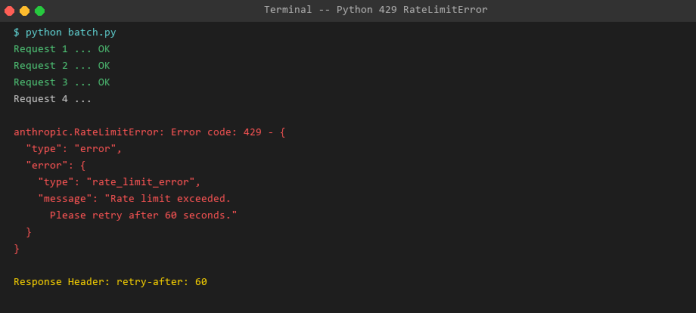
解决方案:指数退避重试代码
import anthropic, time

client = anthropic.Anthropic(
    api_key="YOUR-KEY",
    base_url="https://api.claudeapi.com"
)

def call_with_retry(prompt, max_retries=3):
    for attempt in range(max_retries):
        try:
            return client.messages.create(
                model="claude-sonnet-4-6",
                max_tokens=1024,
                messages=[{"role": "user", "content": prompt}]
            )
        except anthropic.RateLimitError:
            wait = 2 ** attempt  # 1s -> 2s -> 4s
            print(f"Rate limited. Waiting {wait}s... (attempt {attempt+1})")
            time.sleep(wait)
    raise Exception("Max retries exceeded")
import anthropic, time

client = anthropic.Anthropic(
    api_key="YOUR-KEY",
    base_url="https://api.claudeapi.com"
)

def call_with_retry(prompt, max_retries=3):
    for attempt in range(max_retries):
        try:
            return client.messages.create(
                model="claude-sonnet-4-6",
                max_tokens=1024,
                messages=[{"role": "user", "content": prompt}]
            )
        except anthropic.RateLimitError:
            wait = 2 ** attempt  # 1s -> 2s -> 4s
            print(f"Rate limited. Waiting {wait}s... (attempt {attempt+1})")
            time.sleep(wait)
    raise Exception("Max retries exceeded")
[图6:指数退避重试成功 — 自动等待后第3次请求成功]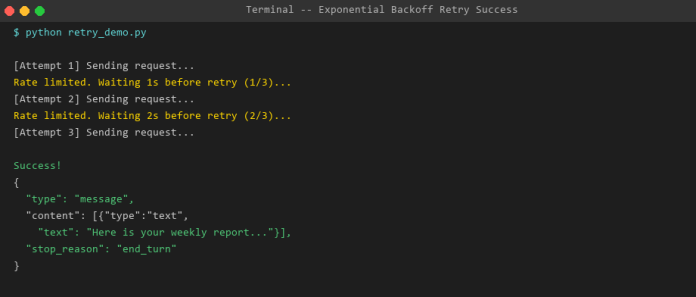
Cherry Studio / Cursor 用户:设置 → 请求间隔填
1000ms,避免连发触发限流。
529 · 服务过载(Overloaded Error)
你会看到什么
{
  "type": "error",
  "error": {
    "type": "overloaded_error",
    "message": "Overloaded"
  }
}
{
  "type": "error",
  "error": {
    "type": "overloaded_error",
    "message": "Overloaded"
  }
}
这个错误来自 Anthropic 官方服务端,表示当前流量过大,不是你的代码或 Key 有问题。
| 场景 | 解决方式 |
|---|---|
| 偶发 529 | 等待 30 秒后重试,通常自动恢复 |
| 持续 529(超过 5 分钟) | 访问 status.anthropic.com 查看官方状态 |
| 生产环境要求高可用 | 用 ClaudeAPI.com —— 多节点自动切换,大幅减少 529 概率 |
带 529 保护的重试代码:
def safe_call(client, **kwargs):
    for i in range(5):
        try:
            return client.messages.create(**kwargs)
        except anthropic.InternalServerError as e:
            if "overloaded" in str(e).lower():
                print(f"Overloaded, retry in 30s ({i+1}/5)")
                time.sleep(30)
            else:
                raise
    raise Exception("Service persistently overloaded")
def safe_call(client, **kwargs):
    for i in range(5):
        try:
            return client.messages.create(**kwargs)
        except anthropic.InternalServerError as e:
            if "overloaded" in str(e).lower():
                print(f"Overloaded, retry in 30s ({i+1}/5)")
                time.sleep(30)
            else:
                raise
    raise Exception("Service persistently overloaded")
连接超时 / 000 · 国内网络问题
这是国内用户最常见的问题,也是最容易被忽视根本原因的问题。
根本原因
你的电脑 -> 国内网络 -> [GFW 拦截] -> api.anthropic.com   # 超时 / 失败
你的电脑 -> 国内网络 -> api.claudeapi.com -> [国际专线] -> Anthropic  # 正常
你的电脑 -> 国内网络 -> [GFW 拦截] -> api.anthropic.com   # 超时 / 失败
你的电脑 -> 国内网络 -> api.claudeapi.com -> [国际专线] -> Anthropic  # 正常
直连官方 API 在国内网络下会超时(平均 500ms 以上,且频繁断流);改用 ClaudeAPI.com 国内直连节点,响应时间 < 200ms。
[图7:curl 直连 api.anthropic.com — 15秒超时,国内网络 GFW 拦截]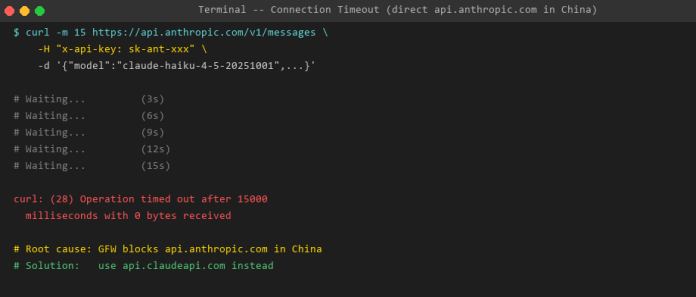
[图8:改用 api.claudeapi.com — 187ms 响应,国内直连无需代理]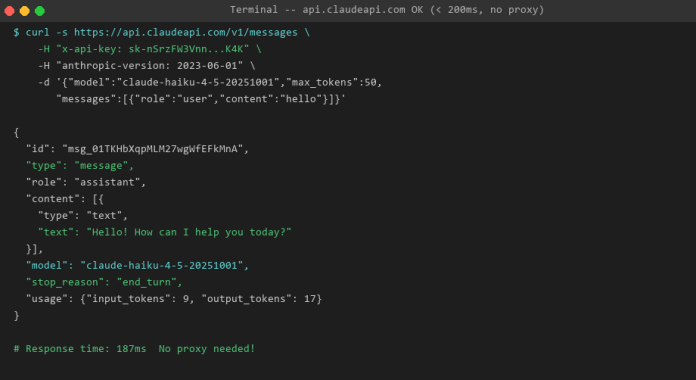
一步解决 —— 各工具配置方法
Python SDK(只改一行):
client = anthropic.Anthropic(
    api_key="YOUR-CLAUDEAPI-KEY",
    base_url="https://api.claudeapi.com"   # 只改这里
)
client = anthropic.Anthropic(
    api_key="YOUR-CLAUDEAPI-KEY",
    base_url="https://api.claudeapi.com"   # 只改这里
)
macOS / Linux 环境变量(永久生效):
export ANTHROPIC_BASE_URL=https://api.claudeapi.com
export ANTHROPIC_API_KEY=YOUR-KEY
source ~/.zshrc
export ANTHROPIC_BASE_URL=https://api.claudeapi.com
export ANTHROPIC_API_KEY=YOUR-KEY
source ~/.zshrc
Windows PowerShell(永久生效):
[System.Environment]::SetEnvironmentVariable("ANTHROPIC_BASE_URL","https://api.claudeapi.com","User")
[System.Environment]::SetEnvironmentVariable("ANTHROPIC_API_KEY","YOUR-KEY","User")
[System.Environment]::SetEnvironmentVariable("ANTHROPIC_BASE_URL","https://api.claudeapi.com","User")
[System.Environment]::SetEnvironmentVariable("ANTHROPIC_API_KEY","YOUR-KEY","User")
Cherry Studio:
设置 → 模型服务 → API 地址填入 https://api.claudeapi.com
Windows CMD 注意:JSON 里的双引号需用
\"转义,或把-d内容写入body.json文件用-d @body.json引用。
[图9:macOS Terminal — curl 请求成功,200 OK 完整响应]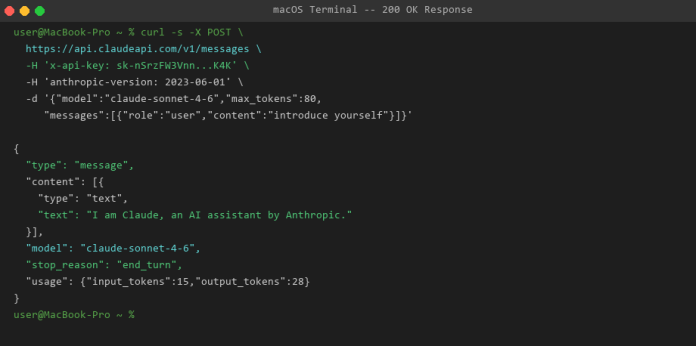
[图10:Windows CMD — curl 请求成功,200 OK 完整响应]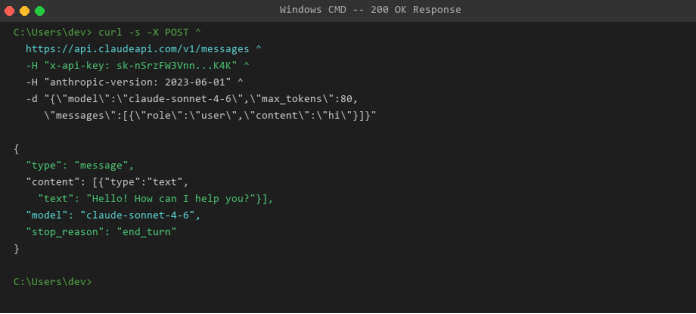
404 · 模型不存在(Not Found Error)
{
  "type": "error",
  "error": {
    "type": "not_found_error",
    "message": "model: claude-opus-4.6 not found"
  }
}
{
  "type": "error",
  "error": {
    "type": "not_found_error",
    "message": "model: claude-opus-4.6 not found"
  }
}
2026 当前正确模型 ID
claude-opus-4-6/4.7               # 最强,复杂推理、长文档
claude-sonnet-4-6             # 均衡,日常开发首选
claude-haiku-4-5-20251001     # 最快最便宜,高频轻任务
claude-opus-4-6/4.7               # 最强,复杂推理、长文档
claude-sonnet-4-6             # 均衡,日常开发首选
claude-haiku-4-5-20251001     # 最快最便宜,高频轻任务
省心做法:从 ClaudeAPI.com 后台「模型列表」页直接复制,不要手打,永远不会写错。
���同客户端报错界面说明
| 客户端 | 平台 | 报错表现位置 |
|---|---|---|
| Python SDK | Win/Mac/Linux | 终端 Traceback 最后一行 anthropic.XxxError |
| Node.js SDK | Win/Mac/Linux | AnthropicError: 后跟状态码和 JSON |
| curl | Win/Mac/Linux | 直接返回 JSON 错误体,HTTP 状态码非 200 |
| Cherry Studio | Win/Mac 桌面 | 设置页红色提示框 + 对话框红底错误卡片 |
| Cherry Studio | iOS / iPadOS | 底部弹出 Toast 红色文字 |
| Cherry Studio | Android | 顶部 Snackbar 横幅红色提示 |
| Cursor | Win/Mac | Chat 面板红字 + 右下角通知气泡 + Output 面板日志 |
国内用户专属推荐
在中国大陆使用 Claude API,连接超时和网络不稳定是绕不开的问题。根本解决方案只有一个:换用 ClaudeAPI.com 国内直连接入点。
| 对比项 | 官方 api.anthropic.com | ClaudeAPI.com |
|---|---|---|
| 国内连通性 | 需要代理,时常断流 | 国内直连,多节点 |
| 平均延迟 | 500ms - 超时不定 | < 200ms |
| 支付方式 | 需要境外信用卡 | 支付宝 / 微信 |
| 发票 | 不支持 | 可开发票 |
| 数据安全 | 官方直接处理 | 请求直转 Anthropic,不缓存 |
| 可用率 | 受 GFW 影响 | 99.8% |
三步完成迁移
第一步:访问 claudeapi.com,扫码添加微信顾问,3 分钟内获取专属 API Key。
第二步:替换一行代码
# 改之前
client = anthropic.Anthropic(api_key="sk-ant-官方Key")

# 改之后(只改这两个参数)
client = anthropic.Anthropic(
    api_key="sk-claudeapi-你的Key",
    base_url="https://api.claudeapi.com"
)
# 改之前
client = anthropic.Anthropic(api_key="sk-ant-官方Key")

# 改之后(只改这两个参数)
client = anthropic.Anthropic(
    api_key="sk-claudeapi-你的Key",
    base_url="https://api.claudeapi.com"
)
第三步:重新运行,不再报连接错误。其他所有代码、模型名、参数完全不用动。
常见问题(FAQ)
Q:401 错误,但我的 Key 肯定是对的,怎么回事?
最常见原因是 Key 来自官方(sk-ant- 开头)但 base_url 设置的是中转地址,或反之。Key 和 base_url 必须来自同一平台。
Q:429 限流,我的请求并不多,为什么?
免费或低级套餐每分钟 / 每天有 Token 上限,不只是请求数量。单次请求如果 max_tokens 设置很大,也容易触发限额。建议升级套餐或联系 ClaudeAPI.com 客服提升限额。
Q:换了 ClaudeAPI.com 之后,其他代码需要改吗?
不需要。只改 api_key 和 base_url 两个参数,模型名、请求格式、响应格式完全一致,100% 兼容。
Q:Cherry Studio 连接测试一直失败,但 curl 可以通?
检查 Cherry Studio 的 API 地址末尾是否有多余的斜杠(/),正确格式是 https://api.claudeapi.com,不带末尾斜杠。
总结
| 报错 | 核心原因 | 解决方向 |
|---|---|---|
| 401 | Key 错误 / 过期 | 重新获取 Key,检查空格 |
| 400 | 参数格式错误 | 检查模型 ID,对照官方列表 |
| 429 | 请求太频繁 | 加重试逻辑,升级套餐 |
| 529 | Anthropic 服务繁忙 | 等待重试,用 ClaudeAPI.com 多节点 |
| 连接超时 | 国内网络限制 | 改用 ClaudeAPI.com,彻底解决 |
| 404 | 模型 ID 拼错 | 从后台复制粘贴,不要手打 |
遇到报错不要慌,先查本文速查表,90% 的问题 5 分钟内可以解决。如果还是搞不定,ClaudeAPI.com 有微信客服,直接发报错截图给客服即可。
相关文章
- Claude Code 国内接入教程:cc-switch 一键切换 API 配置 →
- Cherry Studio 接入 Claude API 完整教程 →
- Claude API 价格详解:2026最新定价 →
本文由 ClaudeAPI.com 团队撰写,持续更新维护。最后更新:2026-04