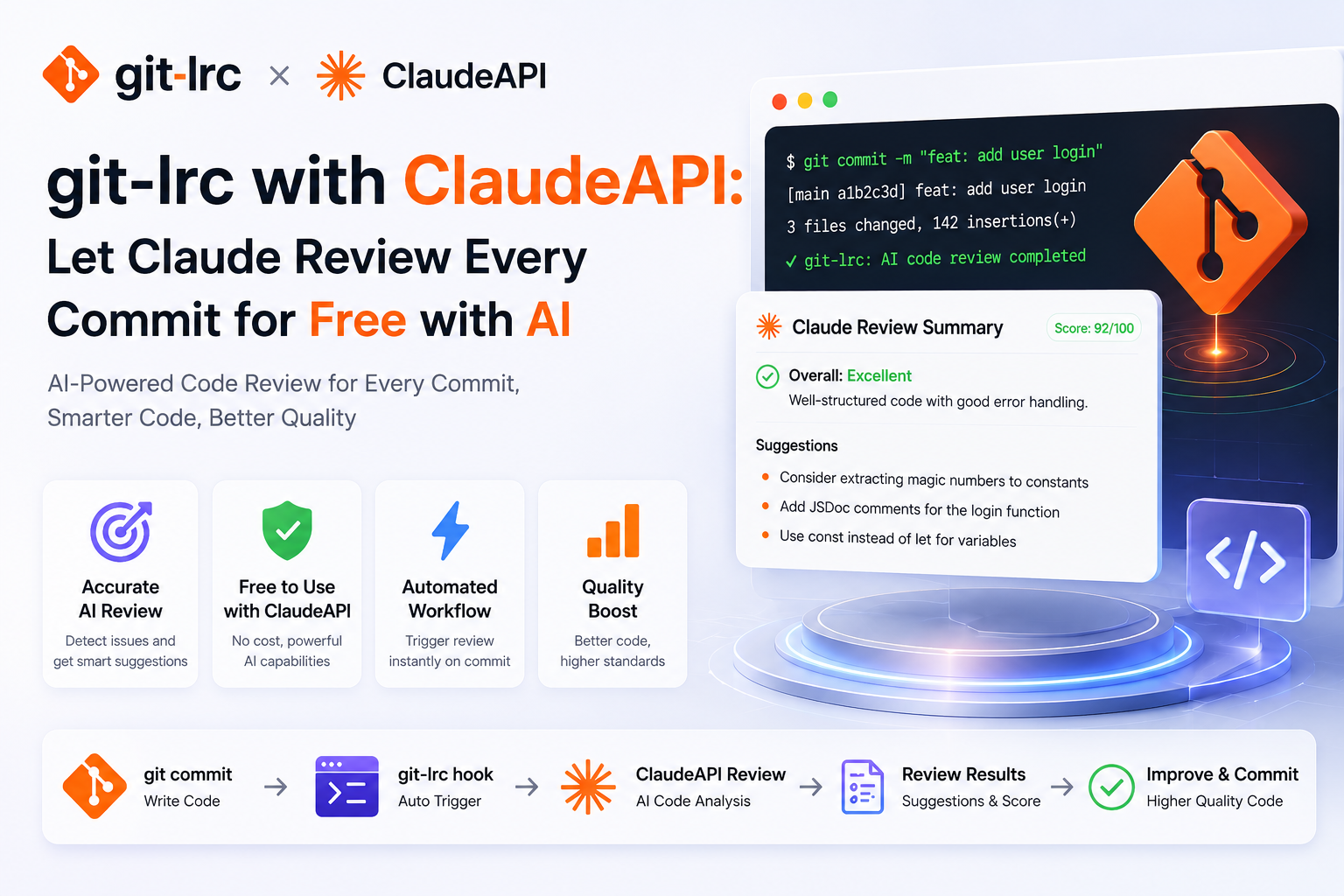
git-lrc + ClaudeAPI: AI code review on every git commit
git-lrc runs an AI code review on every git commit, catching problems in the staged diff before they enter your project history. Its v0.4.7 release (June 4, 2026) adds an Anthropic Compatible API connector, so you can point the review backend at a Claude-compatible endpoint like ClaudeAPI. This guide walks through that setup end to end.
Why git-lrc, and what changed in v0.4.7
git-lrc supports BYOK (Bring Your Own Key). It defaults to Google Gemini’s free tier and also works with OpenAI, Claude, DeepSeek, and OpenRouter.
The key change in v0.4.7 is a new Anthropic Compatible API connector, with gw.claudeapi.com built in as a preset in the Base URL dropdown. You don’t have to type a URL — pick the preset and the review backend points at ClaudeAPI’s low-latency gateway. That’s the core configuration this guide covers.
Unlike GUI apps where you have to set environment variables to work around the interface, git-lrc exposes Provider / Base URL / Model directly in the UI, so configuration is the most direct part.
Docs and release notes:
- git-lrc project home: https://github.com/HexmosTech/git-lrc
- Compatible API support section: https://github.com/HexmosTech/git-lrc#compatible-api-support
- v0.4.7 release notes: https://github.com/HexmosTech/git-lrc/releases/tag/v0.4.7
- ClaudeAPI blog: https://claudeapi.com/en/blog/
What is git-lrc
git-lrc is a free, source-available pre-commit code review tool, with the tagline Free, Micro AI Code Reviews That Run on Commit. Before you run git commit, it automatically runs an AI check over the change (the diff), helping prevent the “invisible bugs” that AI-generated code can introduce.
Core features at a glance:
- Automatic trigger + manual control: runs automatically on
git commitby default, and also supports manualgit lrc review. - Three handling modes:
review(run the AI review),vouch(manually vouch and skip the AI), andskip(skip entirely) — every action is written togit log. - AI-driven review: focuses on accidentally deleted logic, removed security checks, leaked credentials, newly introduced expensive cloud API calls, sensitive data written to logs, and similar issues.
- Interactive review interface: a local web page with GitHub-style diffs, severity-graded inline comments, a review summary, one-click issue copy, and an event log.
- Transparent audit trail: each review’s status (whether it ran, iteration count, coverage) is written to
git logas metadata. - Privacy-friendly: it only analyzes the staged diff and does not store the diff after the review.
Prerequisites: a ClaudeAPI key and git-lrc
Sign up for ClaudeAPI and get a key
- Go to claudeapi.com and sign up with a phone number or email.
- Open the console.claudeapi.com console.
- Top up your account balance — payments are processed via Stripe with support for major credit cards.
- Create an API key (you must select a group), and copy the key that starts with
sk-.
Endpoint:
https://gw.claudeapi.com
https://gw.claudeapi.com
This is the root path for Anthropic’s native API protocol. The git-lrc dropdown preset ClaudeAPI (gw.claudeapi.com) already fills it in for you — no need to append /v1 manually.
Install git-lrc
Recommended via IPM (installs the git hook globally):
# Linux / macOS
curl -L https://hexmos.com/ipm-install | bash && ipm i HexmosTech/git-lrc

# Windows (PowerShell)
iwr https://hexmos.com/ipm-install-ps | iex; ipm i HexmosTech/git-lrc
# Linux / macOS
curl -L https://hexmos.com/ipm-install | bash && ipm i HexmosTech/git-lrc

# Windows (PowerShell)
iwr https://hexmos.com/ipm-install-ps | iex; ipm i HexmosTech/git-lrc
Already installed? Update to v0.4.7:
lrc self-update
lrc self-update
Check the version (confirm ≥ 0.4.7, otherwise the Anthropic Compatible API option won’t appear):
lrc --version
lrc --version
Smoke-test the endpoint (don’t skip this)
Before opening the git-lrc UI, confirm the ClaudeAPI endpoint itself works — otherwise, if a review fails later, you won’t know whether it’s a key problem or a config problem.
Fire one request against Anthropic’s native protocol with cURL:
curl https://gw.claudeapi.com/v1/messages \
  -H "x-api-key: sk-your-claudeapi-key" \
  -H "anthropic-version: 2023-06-01" \
  -H "content-type: application/json" \
  -d '{
    "model": "claude-sonnet-4-6",
    "max_tokens": 256,
    "messages": [{"role": "user", "content": "Reply with pong only"}]
  }'
curl https://gw.claudeapi.com/v1/messages \
  -H "x-api-key: sk-your-claudeapi-key" \
  -H "anthropic-version: 2023-06-01" \
  -H "content-type: application/json" \
  -d '{
    "model": "claude-sonnet-4-6",
    "max_tokens": 256,
    "messages": [{"role": "user", "content": "Reply with pong only"}]
  }'
On Windows, PowerShell’s Invoke-RestMethod is more reliable:
$headers = @{
  "x-api-key"         = "sk-your-claudeapi-key"
  "anthropic-version" = "2023-06-01"
  "content-type"      = "application/json"
}
$body = @{
  model      = "claude-sonnet-4-6"
  max_tokens = 256
  messages   = @(@{ role = "user"; content = "Reply with pong only" })
} | ConvertTo-Json -Depth 5

Invoke-RestMethod -Method Post `
  -Uri "https://gw.claudeapi.com/v1/messages" `
  -Headers $headers -Body $body -TimeoutSec 120
$headers = @{
  "x-api-key"         = "sk-your-claudeapi-key"
  "anthropic-version" = "2023-06-01"
  "content-type"      = "application/json"
}
$body = @{
  model      = "claude-sonnet-4-6"
  max_tokens = 256
  messages   = @(@{ role = "user"; content = "Reply with pong only" })
} | ConvertTo-Json -Depth 5

Invoke-RestMethod -Method Post `
  -Uri "https://gw.claudeapi.com/v1/messages" `
  -Headers $headers -Body $body -TimeoutSec 120
Check only: HTTP 200, a content array with type: "text" and non-empty text, and a model field matching the request. Once it works, move to the UI.
Configure the connector for ClaudeAPI
Open the admin UI:
lrc ui
lrc ui
Go to AI Connectors → Edit Connector and configure it as shown:
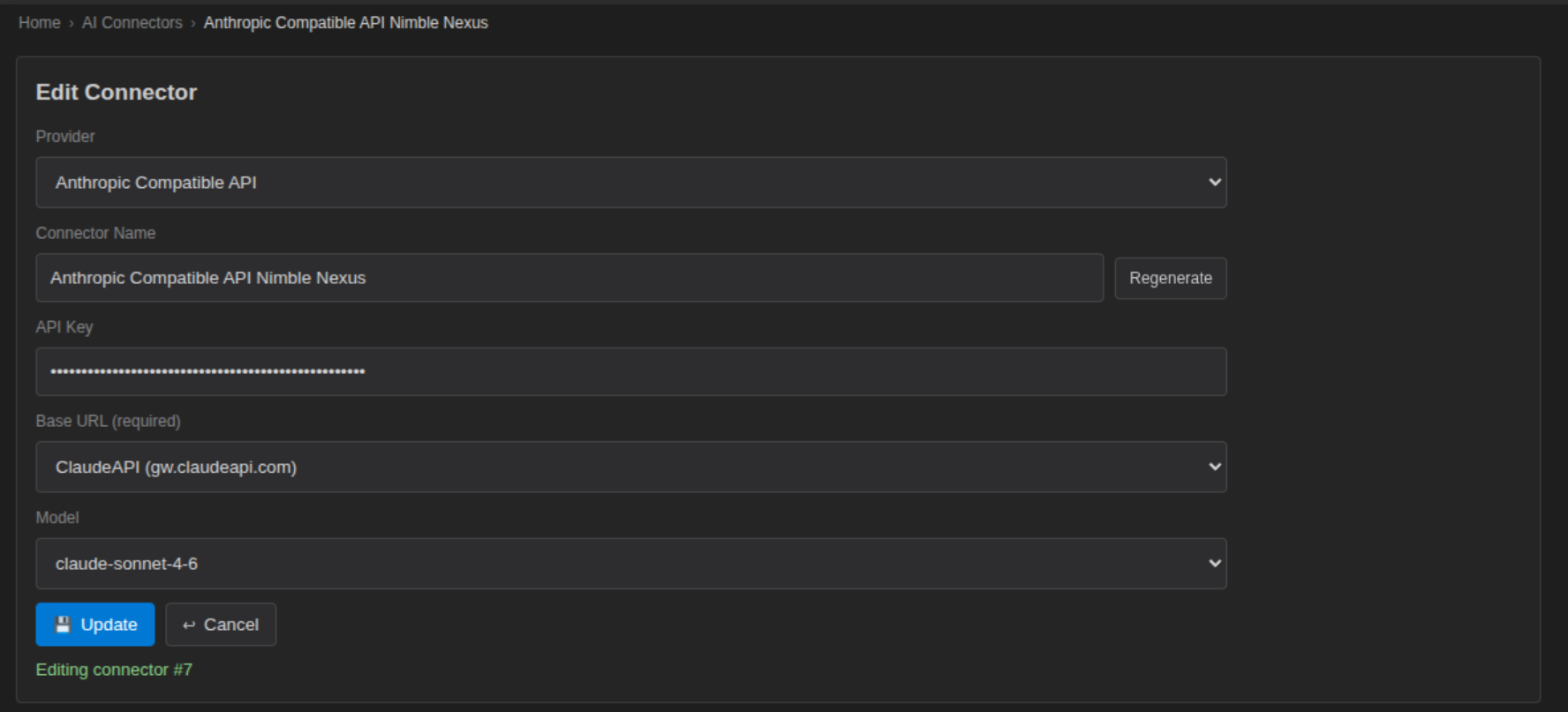
Field by field:
| Field | Value | Notes |
|---|---|---|
| Provider | Anthropic Compatible API |
New in v0.4.7; if it’s missing, run lrc self-update first |
| Connector Name | Keep the auto-generated name | e.g. Anthropic Compatible API Nimble Nexus; click Regenerate to change it |
| API Key | sk-your-claudeapi-key |
The key from the Prerequisites step |
| Base URL (required) | Select ClaudeAPI (gw.claudeapi.com) from the dropdown |
Built-in preset — just select it, no manual entry; custom URLs are also supported |
| Model | claude-sonnet-4-6 |
The Claude model used for review; Sonnet 4.6 is a good price/performance fit for reviewing code |
Click Update to save.
Key step: git-lrc uses the first connector in the list by default. If you want commits to use ClaudeAPI by default, go back to the connector list and drag this one to the top.
Reviewing commits with Claude
Once configured, a normal git commit triggers a review (or run git lrc review manually). Results render on a local web page as a GitHub-style diff, with Critical / Error / Warning / Info graded comments:
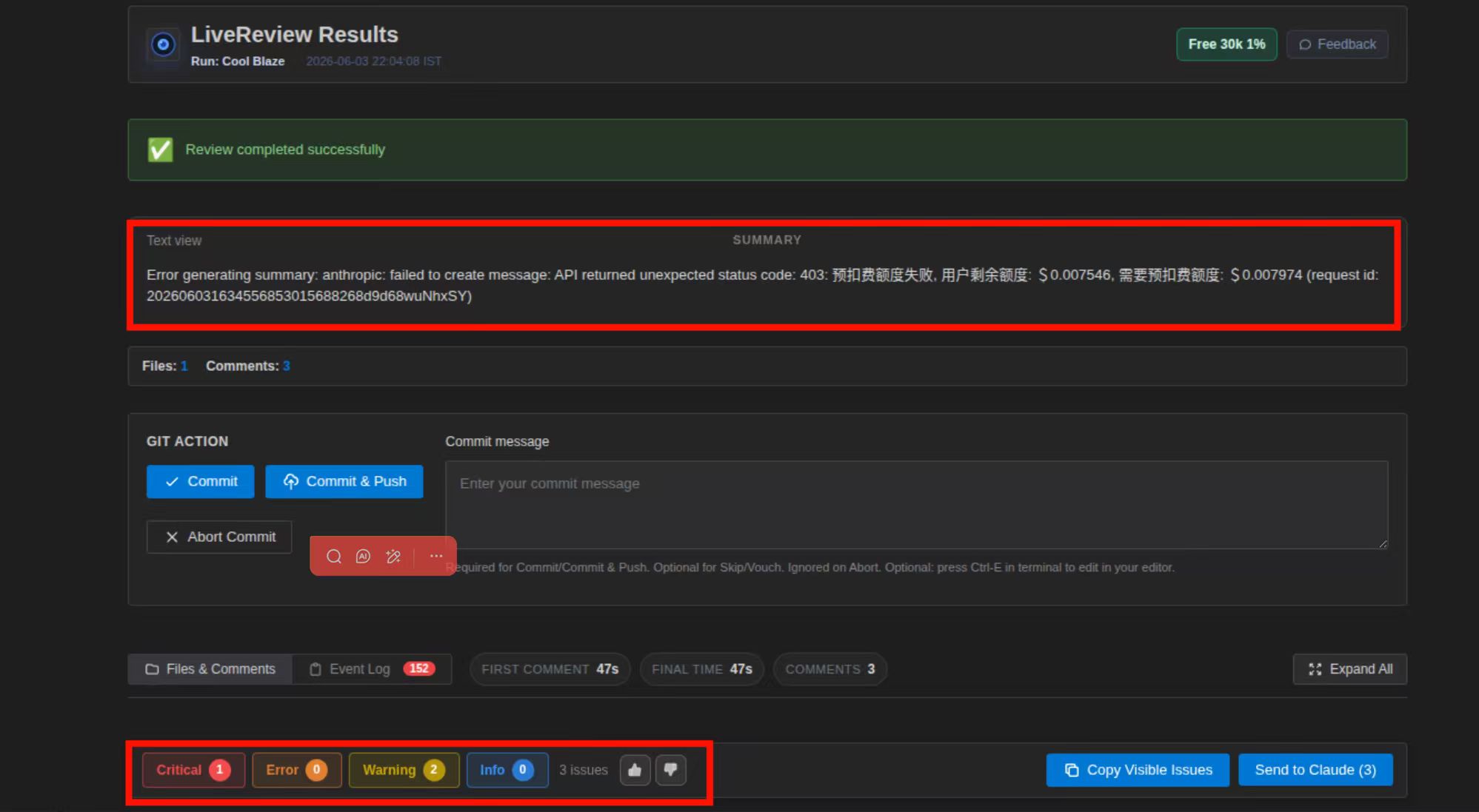
The top of the page is the review summary, the middle shows file and comment counts, and the GIT ACTION area at the bottom lets you choose Commit, Commit & Push, or Abort Commit directly — plus one-click Copy Visible Issues or Send to Claude to keep asking follow-ups.
💡 The summary area above actually shows a real scenario —
403: pre-authorization failed; user remaining balance: $0.007546, required pre-authorization: $0.007974. This confirms git-lrc is genuinely calling the ClaudeAPI endpoint; the account balance was just a hair short. Top up ClaudeAPI and the summary generates normally — which incidentally proves the connector is truly wired up.
Common errors & troubleshooting
| Symptom | Cause | Fix |
|---|---|---|
No Anthropic Compatible API in the Provider dropdown |
git-lrc older than 0.4.7 | Run lrc self-update, then reopen lrc ui |
| 401 Unauthorized | Wrong key / system proxy interception | Check the key; add gw.claudeapi.com to your proxy exclusions |
| 403 pre-authorization failed / insufficient balance | ClaudeAPI balance too low for this review | Top up at console.claudeapi.com |
| 403 Forbidden | Key has no group assigned | Recreate the key in the console and select a group |
| 404 Not Found | Custom Base URL written as https://gw.claudeapi.com/v1 |
Use the dropdown preset, or enter the root path without /v1 |
| 429 Too Many Requests | Concurrency limit exceeded | Lower concurrency; switch to a higher-quota group |
| Commit still routes to Gemini / another connector | The ClaudeAPI connector isn’t first in the list | Drag it to the top of the connector list |
model does not support tool calling |
Selected a model ID without function-calling support | Switch back to claude-sonnet-4-6 / claude-opus-4-7 |
| Review summary fails but comments work | Balance ran out exactly at the summary step | Same as the 403 balance issue — top up |
Configuration quick reference
git-lrc connector (lrc ui → AI Connectors → Edit Connector)
├── Provider   : Anthropic Compatible API
├── API Key    : sk-your-claudeapi-key
├── Base URL   : ClaudeAPI (gw.claudeapi.com)   ← built-in dropdown preset
└── Model      : claude-sonnet-4-6

Don't forget
└── Drag this connector to the top of the list (git-lrc uses the first one)

Verify the chain
1. curl https://gw.claudeapi.com/v1/messages ...   # endpoint works
2. lrc --version                                   # ≥ 0.4.7
3. git commit                                      # triggers review, see the web result page
git-lrc connector (lrc ui → AI Connectors → Edit Connector)
├── Provider   : Anthropic Compatible API
├── API Key    : sk-your-claudeapi-key
├── Base URL   : ClaudeAPI (gw.claudeapi.com)   ← built-in dropdown preset
└── Model      : claude-sonnet-4-6

Don't forget
└── Drag this connector to the top of the list (git-lrc uses the first one)

Verify the chain
1. curl https://gw.claudeapi.com/v1/messages ...   # endpoint works
2. lrc --version                                   # ≥ 0.4.7
3. git commit                                      # triggers review, see the web result page
Resource list:
| Resource | Link |
|---|---|
| git-lrc project home | https://github.com/HexmosTech/git-lrc |
| Compatible API support docs | https://github.com/HexmosTech/git-lrc#compatible-api-support |
| v0.4.7 release notes | https://github.com/HexmosTech/git-lrc/releases/tag/v0.4.7 |
| ClaudeAPI console | https://console.claudeapi.com |
| ClaudeAPI website | https://claudeapi.com |
Summary
git-lrc puts AI code review at the git commit sweet spot — earlier than a PR, independent of any one IDE, and not easily skipped. After v0.4.7, connecting ClaudeAPI takes three steps:
lrc ui→ set Provider to Anthropic Compatible API- Pick the built-in
ClaudeAPI (gw.claudeapi.com)preset from the Base URL dropdown, paste your key, and set Model toclaude-sonnet-4-6 - Drag this connector to the top of the list — after that, every
git commitgets a Claude review
Pointing git-lrc’s review backend at ClaudeAPI’s Anthropic-compatible endpoint gives you a low-latency gateway and low-cost Claude review on every commit.
Get started
ClaudeAPI gives you stable, production-ready access to Claude through a single Anthropic-compatible endpoint. Get an API key and wire up your first git-lrc review in minutes.