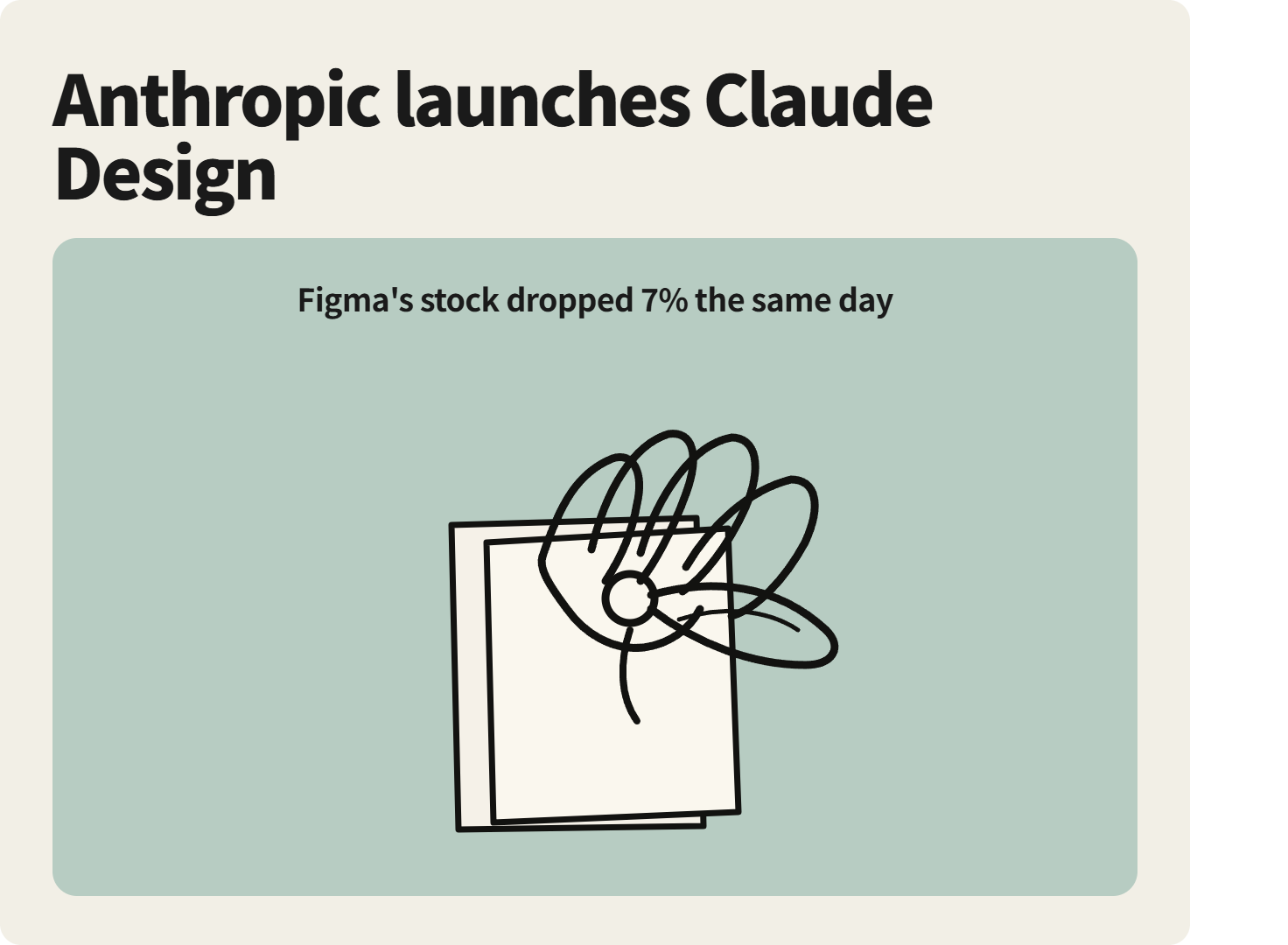
On April 17, 2026, Figma’s stock suddenly tanked more than 7%. The trigger? A single announcement: Anthropic had just launched Claude Design — an AI design tool that generates designs, prototypes, and presentations through natural conversation.
The timing made the subtext impossible to ignore: just three days earlier, Anthropic’s Chief Product Officer Mike Krieger had quietly stepped down from Figma’s board of directors. Anthropic’s strategic direction had become crystal clear.
What Is Claude Design?
Claude Design is a new product from Anthropic Labs, powered by Claude Opus 4.7. It’s currently available as a research preview for Claude Pro, Max, Team, and Enterprise subscribers — Free plan users are not included.
Accessing it is straightforward: head to Claude.ai, look for the palette icon in the left sidebar, and you’re in. It’s not a standalone app — it’s built directly into Claude.ai.
Unlike professional design tools like Figma, Claude Design is built for people who can’t design — founders, product managers, marketers, and anyone who’s tired of waiting in the “find a designer” queue.
If you’re already using Claudeapi.com to access Claude Opus 4.7, what follows will give you a much more concrete sense of what Opus 4.7’s visual capabilities actually look like in practice.
Core Features Breakdown
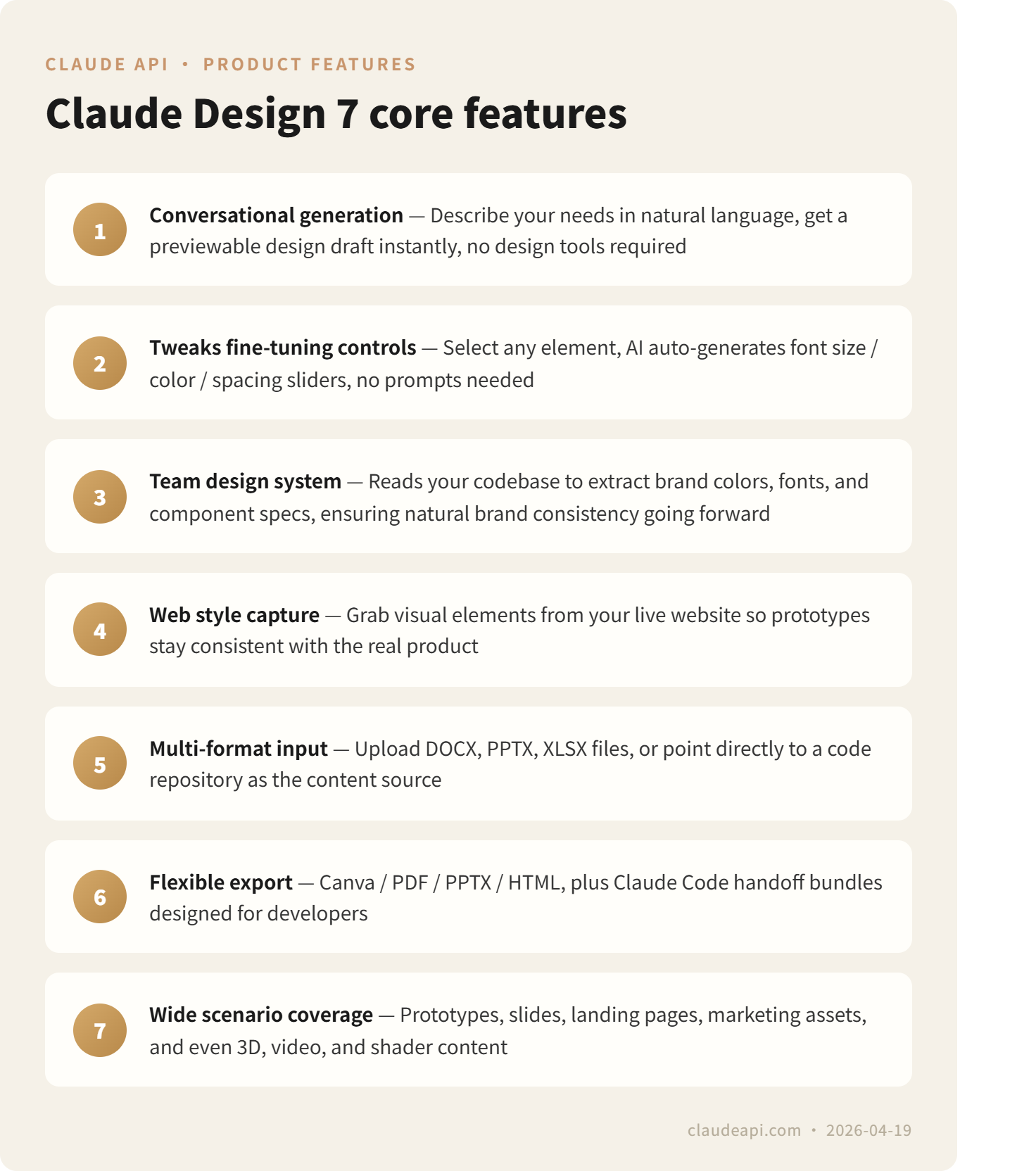
Conversational Generation — No Tool Learning Required
Tell Claude Design: “Create a feature overview page for a SaaS product — brand blue, modern and minimal” — and it hands you a solid first draft. Edits work the same way: “Make the headline bigger, swap the right side for an illustration style” — no menus, no toolbar, just conversation.
Even more useful is the Tweaks control panel: select any design element and Claude Design auto-generates context-specific controls for it (font size sliders, color pickers, etc.), letting you make precise adjustments without writing a single prompt.
Automatic Brand System Recognition
For teams with an existing design system, Claude Design can read your codebase and design files on onboarding — automatically extracting your brand colors, typography, and component specs, then applying them consistently across every future project. Every output is on-brand by default. No need to re-explain your guidelines each time.
What You Can Actually Build
Claude Design supports a wider range of use cases than you might expect:
-
Prototypes & Wireframes — product UI concepts, user flow diagrams
-
Presentations — pitch decks, product launch slides
Marketing assets — landing pages, social media graphics, one-pagers
- Experimental content — 3D renders, audio visualizations, video clips, color palettes
Flexible Input Methods
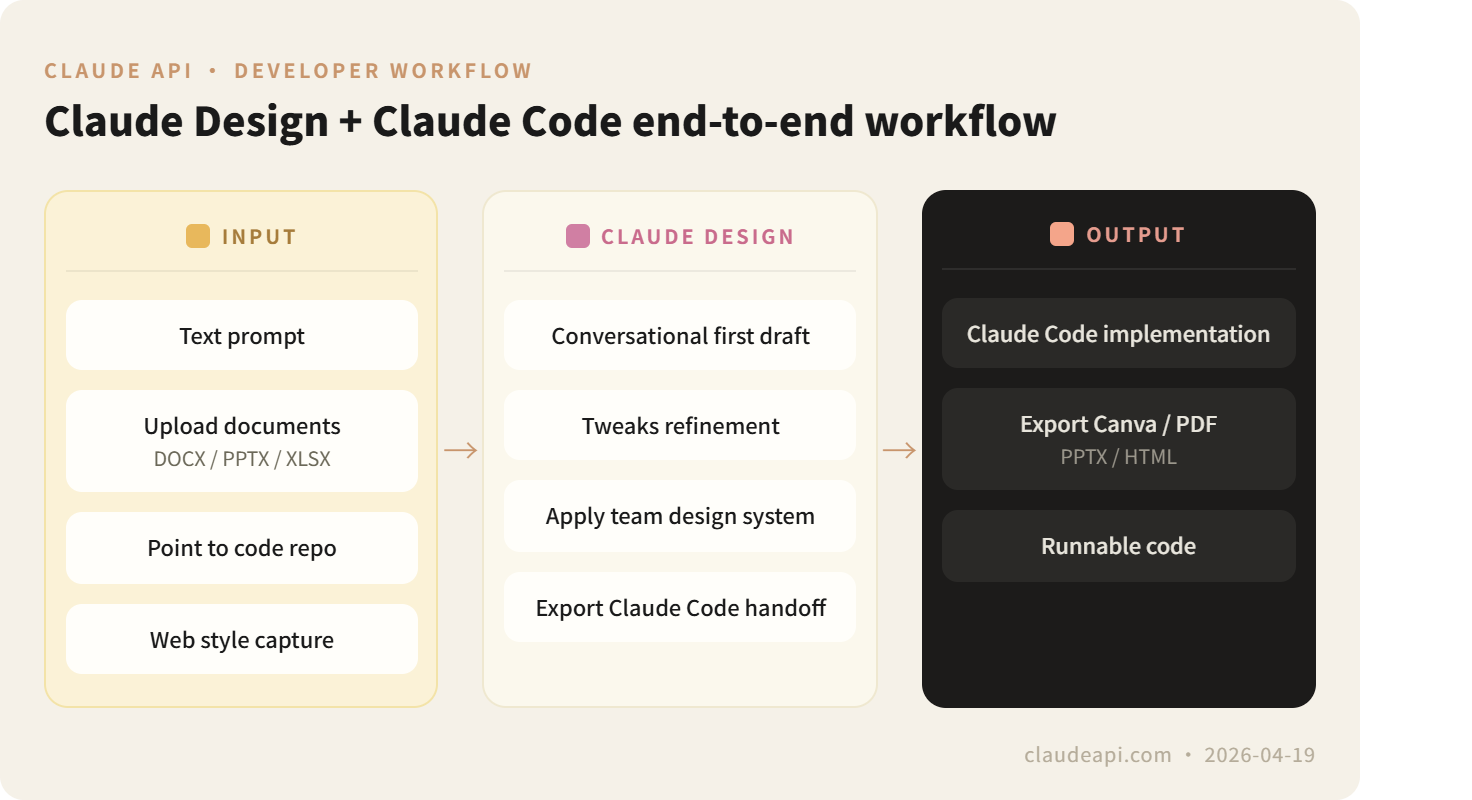
Beyond plain text descriptions, you can also:
-
Upload Word, PowerPoint, or Excel files as content sources
-
Point to a code repository
-
Use a web scraper to pull your existing site’s visual style — so prototypes stay consistent with your live product
Export Formats
When you’re done, export as: Canva format, PDF, PPTX, standalone HTML — or a Claude Code handoff package that includes structured implementation notes, ready to hand off to an engineer or feed directly into Claude Code.
Who This Actually Affects
Founders & Product Managers Need a pitch deck? You used to wait for a designer’s availability. Now you can produce a presentation-ready draft yourself and hand it to a designer only for polish. UI prototypes that once took a week to spec can be turned around in an afternoon.
Marketers
Landing pages, banners, and social assets no longer depend on designer availability. When your copy is ready but the design isn’t, use Claude Design to produce an aligned visual draft — get everyone on the same page first, then hand it off for production.
Developers — Most Worth Paying Attention To
Claude Design integrates tightly with Claude Code. The workflow: build your prototype in Claude Design → export a Claude Code handoff package → hand it directly to Claude Code for implementation. From requirements description to running code, entirely within the Claude ecosystem.
A designer at Jane Street shared her real-world workflow publicly: she uses Claude Design to iterate on the visual direction of new apps. “For some new projects, I’ve skipped Figma entirely — I just drive the whole visual design process inside Claude from day one.”
Professional Designers
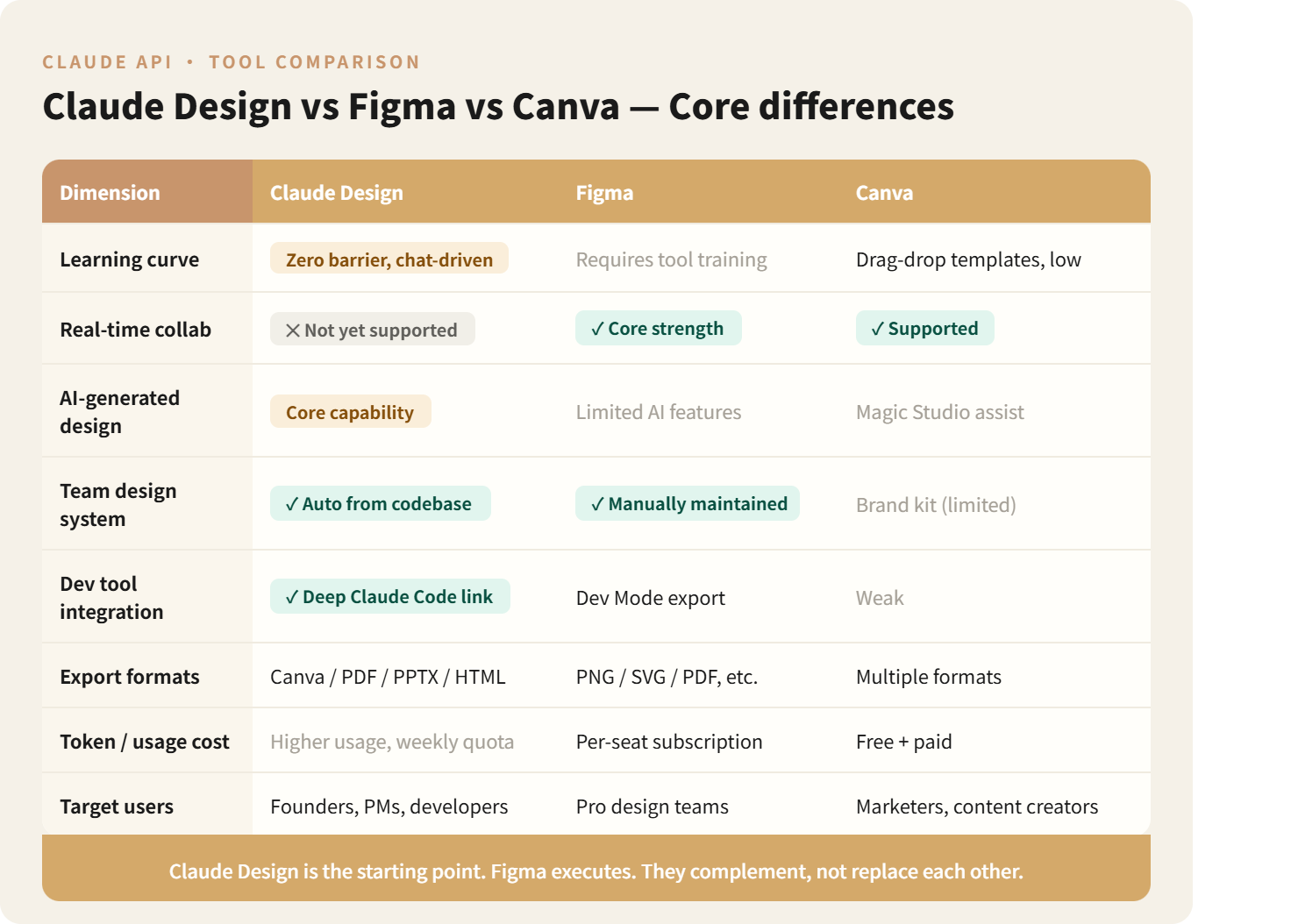
The value here is in accelerating early exploration. Generate 10 design directions fast in Claude Design, find the one that feels right, then move into Figma for refinement. That’s actually how Anthropic positions it — Claude Design is the starting point, Figma is the execution tool. They’re complementary, not competing.
Market Reaction
Within 6 hours of launch, the Hacker News thread hit 662 upvotes and 449 comments. The developer community’s verdict was clear: “This is the missing layer in the vibe coding workflow” — you already had Claude Code for writing code with natural language; now you have the equivalent for building interfaces.
The pressure on Figma is real. Anthropic CPO Mike Krieger resigned from Figma’s board three days before Claude Design launched. Anthropic’s official line is that Claude Design “complements” rather than replaces Figma — but the market clearly isn’t reading it that way.
For AI design tools like Lovable that rely on the Claude API, the situation is more complicated: the underlying model provider is now moving into the same market.
Limitations Worth Knowing Before You Start
No real-time collaboration. One of Figma’s core strengths is multiple designers working simultaneously in the same file. Claude Design is currently single-session only — Team plan users get workspace sharing, but not co-editing.
High token consumption. Based on Pro user reports, two full design sessions consumed 58% of a weekly quota. Claude Design has its own separate allocation that doesn’t draw from your chat quota — but weekly limits still apply, and Enterprise users have it disabled by default (requires manual activation by an admin).
No direct Figma file import. Teams with large existing Figma asset libraries should factor in migration costs before committing.
Still in research preview. Features are actively evolving — stability and output quality aren’t yet at production-grade levels.
What This Means for ClaudeAPI Users
For developers building products with ClaudeAPI, the most immediate impact is straightforward: the cost of prototyping and shipping an MVP just dropped significantly.
The old workflow looked like this:
Write PRD → find a designer → wait for mockups → frontend implementation
With Claude Design, it becomes:
Describe requirements → Claude Design generates prototype → export Claude Code handoff package → Claude Code implements
The entire loop closes within the Claude ecosystem.
Claude Design doesn’t yet have a public standalone API. But there’s a practical workaround available right now: call Claude Opus 4.7 via Claudeapi, explicitly prompt it to generate structured HTML layouts or Tailwind components, then pass the output to Claude Code for implementation. It’s a lightweight alternative that gets you most of the way there today.
Final Thoughts
The most significant thing about Claude Design isn’t what it can do today — it’s what it signals about where things are heading: Anthropic is evolving from a model company into a workflow company.
From Claude Code to Claude Design, Anthropic is steadily embedding AI capabilities into concrete, task-specific workflows. If you’re on Claude Pro or above, you can already find it in the left sidebar on Claude.ai — look for the palette icon and start exploring.
Want to build your own applications on top of Claude Opus 4.7’s API capabilities? Visit the ClaudeAPI dashboard to grab an API key — with reliable access from anywhere, no VPN required. Want to build your own applications on top of Claude Opus 4.7’s API capabilities? Visit the ClaudeAPI dashboard to grab an API key — with reliable access from anywhere, no VPN required.
References
- Introducing Claude Design by Anthropic Labs — Anthropic Official
- Anthropic launches Claude Design — TechCrunch
- Figma Stock Immediately Nosedives — Gizmodo
- Prompts to Prototypes — VentureBeat
- I design with Claude more than Figma now — Jane Street Blog
- Claude Design Challenges Figma — The New Stack