
Claude API Error Handbook (2026): How to Fix 401, 429, 529, and Other Common Failures

The 6 most common Claude API errors — with real response bodies and step-by-step fixes for Python, curl, Cherry Studio, and Cursor.
What You’ll Learn
- ✅ How to quickly identify the 6 core Claude API errors: 401 / 400 / 429 / 529 / 404
- ✅ What the actual JSON response body looks like for each error
- ✅ How each error surfaces across Python SDK, curl, Cherry Studio, and Cursor
- ✅ A one-step fix for every error — no guesswork
- ✅ Why API connections time out and how to resolve it permanently
- ✅ Exponential backoff retry code so 429/529 errors never kill your job mid-run
Quick Reference: Error Lookup Table
Hit an error? Find your HTTP status code below and jump straight to the fix.
| Status Code | Error Type | Most Common Cause | Quick Fix |
|---|---|---|---|
| 401 | Authentication Failure | Wrong or expired API key | Re-copy your key; check for extra whitespace |
| 400 | Bad Request | Misspelled model name or malformed params | Check the model field against the docs |
| 429 | Too Many Requests | Rate limit exceeded | Add retry logic, or upgrade your usage tier |
| 529 | Service Overloaded | Anthropic servers under heavy load | Wait 30s and retry, or switch to a relay endpoint |
| 404 | Model Not Found | Incorrect model ID | Cross-reference the model list at the end of this guide |
401 · Authentication Error
What You’ll See
{
  "type": "error",
  "error": {
    "type": "authentication_error",
    "message": "invalid x-api-key"
  }
}
{
  "type": "error",
  "error": {
    "type": "authentication_error",
    "message": "invalid x-api-key"
  }
}
HTTP Status Code:401 Unauthorized
[Figure1:Python SDK 401 AuthenticationError ]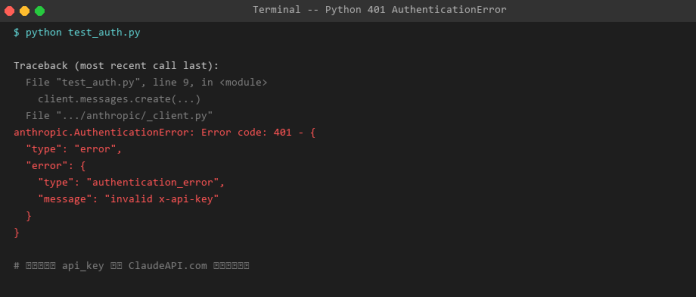
[Figure2:curl 401 Unauthorized Return to JSON]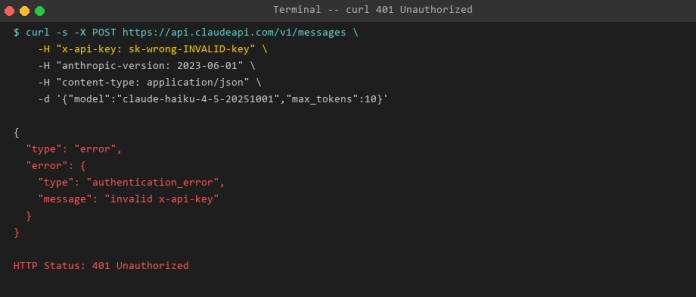
How each client surfaces this error:
- Python SDK:Traceback ends with
anthropic.Authentication Error - curl:Returns the JSON error body shown above directly in the terminal
- Cherry Studio:Settings page shows a red alert banner: “Connection failed · 401 Unauthorized”, with detail
authentication_error: invalid x-api-key - Cursor:Bottom-right toast notification: ⚠
Claude API Error: 401 Unauthorized,click to expand full details
Solutions
| Cause | How to Check | Fix |
|---|---|---|
| Extra whitespace when copying the key | echo $ANTHROPIC_API_KEY|cat -A — check for trailing characters |
Re-copy the key; avoid double-click selection |
| Key expired or revoked | Log into claudeapi.com dashboard and verify key status | Generate a new key and update all configs |
| Official key but request hitting a proxy | Check whether base_url and the key are from the same platform |
Key and base_url must match |
| Windows environment variable not taking effect | echo %ANTHROPIC_API_KEY% |
Re-set via PowerShell and restart the terminal |
Correct usage (Python SDK):
import anthropic

client = anthropic.Anthropic(
    api_key="sk-YOUR-CLAUDEAPI-KEY",       # from ClaudeAPI.com
    base_url="https://api.claudeapi.com"   # claudeapi.com endpoint
)
import anthropic

client = anthropic.Anthropic(
    api_key="sk-YOUR-CLAUDEAPI-KEY",       # from ClaudeAPI.com
    base_url="https://api.claudeapi.com"   # claudeapi.com endpoint
)
Windows users:In PowerShell , use
$env:ANTHROPIC_API_KEY="sk-..."notexport
400 · Invalid Request Error
What you’ll see
{
  "type": "error",
  "error": {
    "type": "invalid_request_error",
    "message": "model `claude-3-5-sonnet` does not exist"
  }
}
{
  "type": "error",
  "error": {
    "type": "invalid_request_error",
    "message": "model `claude-3-5-sonnet` does not exist"
  }
}
[Figure3:Python 400 BadRequestError — triggered by a wrong model name]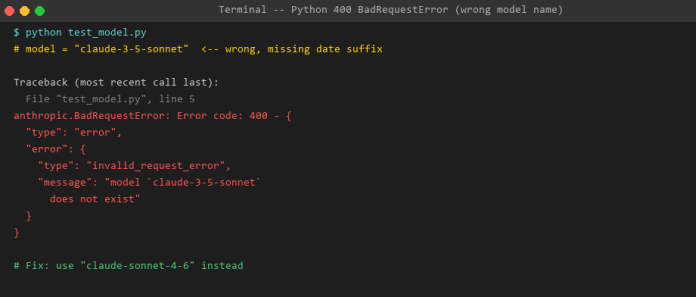
[Figure4:curl 400 Bad Request — JSON response for wrong model name]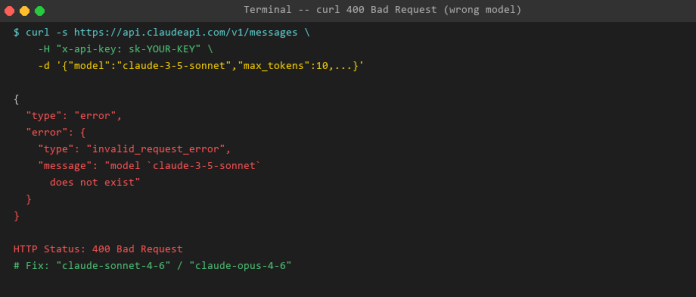
Fix: Correct Model ID Reference(2026)
| Model | ❌ Wrong | ✅ Correct |
|---|---|---|
| Claude Opus — most capable | claude-opus-4 |
claude-opus-4-6 |
| Claude Sonnet — everyday use | claude-3-5-sonnet |
claude-sonnet-4-6 |
| Claude Haiku — fast & lightweight | claude-3-haiku |
claude-haiku-4-5-20251001 |
** Pro tip**:Copy model IDs directly from the Available Models page in your code0.ai dashboard — never type them by hand, and you’ll never get them wrong.
429 · Rate Limit Error
What you’ll see
{
  "type": "error",
  "error": {
    "type": "rate_limit_error",
    "message": "Rate limit exceeded. Please retry after 60 seconds."
  }
}
{
  "type": "error",
  "error": {
    "type": "rate_limit_error",
    "message": "Rate limit exceeded. Please retry after 60 seconds."
  }
}
The response header will also include:retry-after: 60
[Figure5:Python 429 RateLimitError — rate limit triggered by batch requests]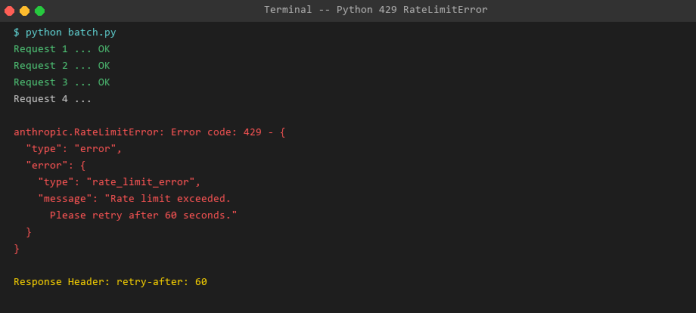
Fix: Exponential Backoff Retry
import anthropic, time

client = anthropic.Anthropic(
    api_key="YOUR-KEY",
    base_url="https://api.claudeapi.com"
)

def call_with_retry(prompt, max_retries=3):
    for attempt in range(max_retries):
        try:
            return client.messages.create(
                model="claude-sonnet-4-6",
                max_tokens=1024,
                messages=[{"role": "user", "content": prompt}]
            )
        except anthropic.RateLimitError:
            wait = 2 ** attempt  # 1s -> 2s -> 4s
            print(f"Rate limited. Waiting {wait}s... (attempt {attempt+1})")
            time.sleep(wait)
    raise Exception("Max retries exceeded")
import anthropic, time

client = anthropic.Anthropic(
    api_key="YOUR-KEY",
    base_url="https://api.claudeapi.com"
)

def call_with_retry(prompt, max_retries=3):
    for attempt in range(max_retries):
        try:
            return client.messages.create(
                model="claude-sonnet-4-6",
                max_tokens=1024,
                messages=[{"role": "user", "content": prompt}]
            )
        except anthropic.RateLimitError:
            wait = 2 ** attempt  # 1s -> 2s -> 4s
            print(f"Rate limited. Waiting {wait}s... (attempt {attempt+1})")
            time.sleep(wait)
    raise Exception("Max retries exceeded")
[Figure6:Exponential backoff retry succeeded]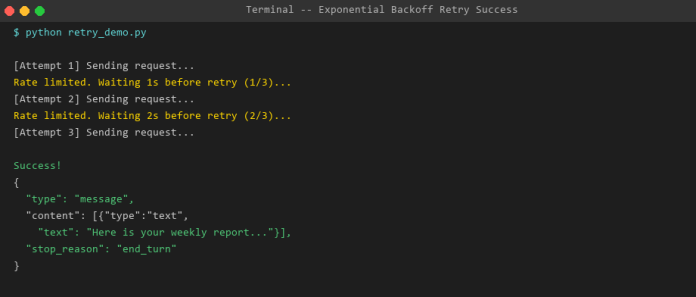
Cherry Studio / Cursor users:Go to Settings → Request Interval, set it to
1000msto avoid hammering the rate limit.
529 · Overloaded Error
What you’ll see
{
  "type": "error",
  "error": {
    "type": "overloaded_error",
    "message": "Overloaded"
  }
}
{
  "type": "error",
  "error": {
    "type": "overloaded_error",
    "message": "Overloaded"
  }
}
This error originates from Anthropic’s servers — it means upstream traffic is too high. It’s not a problem with your code or API key. How to handle it
| Scenario | What to do |
|---|---|
| Occasional 529 | Wait 30 seconds and retry — usually resolves on its own |
| Persistent 529 (5+ minutes) | Check status.anthropic.com for upstream incidents |
| Production with high availability needs | Use claudeapi.com — multi-node routing significantly reduces 529 exposure |
Retry Code with 529 Protection:
def safe_call(client, **kwargs):
    for i in range(5):
        try:
            return client.messages.create(**kwargs)
        except anthropic.InternalServerError as e:
            if "overloaded" in str(e).lower():
                print(f"Overloaded, retry in 30s ({i+1}/5)")
                time.sleep(30)
            else:
                raise
    raise Exception("Service persistently overloaded")
def safe_call(client, **kwargs):
    for i in range(5):
        try:
            return client.messages.create(**kwargs)
        except anthropic.InternalServerError as e:
            if "overloaded" in str(e).lower():
                print(f"Overloaded, retry in 30s ({i+1}/5)")
                time.sleep(30)
            else:
                raise
    raise Exception("Service persistently overloaded")
404 · Model Not Found Error
{
  "type": "error",
  "error": {
    "type": "not_found_error",
    "message": "model: claude-opus-4 not found"
  }
}
{
  "type": "error",
  "error": {
    "type": "not_found_error",
    "message": "model: claude-opus-4 not found"
  }
}
Current Valid Model IDs
claude-opus-4-6               # Most powerful — complex reasoning & long documents
claude-sonnet-4-6             # Balanced — the go-to for everyday dev work
claude-haiku-4-5-20251001     # Fastest & cheapest — high-frequency light tasks
claude-opus-4-6               # Most powerful — complex reasoning & long documents
claude-sonnet-4-6             # Balanced — the go-to for everyday dev work
claude-haiku-4-5-20251001     # Fastest & cheapest — high-frequency light tasks
Pro tip:Copy model IDs directly from the Model List page in your ClaudeAPI.com dashboard — no typos, ever.
How Errors Surface Across Different Clients
| Client | Platform | Where the Error Appears |
|---|---|---|
| Python SDK | Win/Mac/Linux | Last line of terminal traceback — anthropic.XxxError |
| Node.js SDK | Win/Mac/Linux | AnthropicError: followed by status code + JSON body |
| curl | Win/Mac/Linux | Raw JSON error body returned directly, HTTP status ≠ 200 |
| Cherry Studio | Win/Mac desktop | Red highlight in Settings + error card at the bottom of the chat |
| Cherry Studio | iOS / iPadOS | Red toast notification at the bottom of the screen |
| Cherry Studio | Android | Red Snackbar banner across the top |
| Cursor | Win/Mac | Red text in Chat panel + bottom-right notification bubble + Output panel logs |
FAQ
Q1:I’m getting a 401 error, but I’m sure my API key is correct — what’s going on?
The most common cause is a key mismatch: your key is from Anthropic’s official platform (starts with sk-ant-) but your base_url points to a proxy endpoint — or vice versa. Your API key and base_url must always come from the same platform.
Q2:I’m hitting 429 rate limits, but I’m barely sending any requests. Why?
Free and lower-tier plans enforce token limits per minute / per day — not just request counts. A single request with a large max_tokens value can burn through your quota fast. Consider upgrading your plan or reaching out to ClaudeAPI.com support to raise your limits.
Q3:Do I need to rewrite my code after switching to ClaudeAPI.com?
No. Just update two parameters — api_key and base_url. Model names, request format, and response format are 100% compatible. Everything else stays the same.
Q4:Cherry Studio connection test keeps failing, but curl works fine — why?
Check whether your API URL in Cherry Studio has a trailing slash (/). The correct format is https://api.claudeapi.com — no trailing slash.
Quick Reference: Error Codes at a Glance
| Error | Root Cause | Fix |
|---|---|---|
| 401 | Invalid or expired key | Re-generate your key; check for whitespace |
| 400 | Malformed request parameters | Verify model ID against the official list |
| 429 | Too many requests / token quota exceeded | Add retry logic; upgrade your plan |
| 529 | Anthropic servers overloaded | Wait and retry; use ClaudeAPI.com multi-node routing |
| 404 | ypo in model ID | Copy-paste from your dashboard, never type manually |
Don’t panic when you hit an error — run through this guide first. 90% of issues resolve within 5 minutes. If you’re still stuck, ClaudeAPI.com support is one message away — just send a screenshot of the error.
Related Articles
- How to Connect Cherry Studio to Claude API — Complete Setup Guide →
- Claude API Pricing Explained: Latest 2026 Rates & Plans →
Written and maintained by the ClaudeAPI.com team. Last updated: April 2026.